Agentic Workflow Series
LLM-Assisted Text Analysis
From Open-Ended Responses to Structured Insights
SMU Libraries
2026-09-23
While we wait: get ready
- Open the slides on your laptop: smu.sg/agentic-text
- Download the project folder from github.com/dpdong19/llm-text-analysis-workshop: green Code button → Download ZIP → unzip it
- Open your coding agent (Claude Code, Codex, …)
- Check Python 3.10+ is installed (when installing, tick “Add Python to PATH”)
- Have your API key ready. No key? We will provide one.
Not sure about anything? Raise your hand and we will come to you.
Welcome
What we are doing today
Today we will build a small workflow that sorts real airline reviews by topic and sentiment, with an AI coding agent writing the code.
By the end, you should be able to:
- describe when chat is enough, and when an API-based workflow helps;
- use a coding agent to build and test a classification pipeline;
- inspect model outputs instead of simply accepting them;
- identify where human judgement still matters.
Today’s plan
Part 1 · Listen
Why and what
- The dataset
- The classification task
- From chat to workflow
- The tools
Part 2 · Do
Hands-on with a coding agent
- 5-min set-up check
- Brief the agent on the task
- Build and test on 3 reviews
- Inspect and refine the prompt
- Scale up to 50 and compare
Part 3 · Reflect
Wrap up
- Quick quiz on Menti bring your phone
- Take-aways
- Q&A and feedback
Before we start
- Join in the way that suits you. Follow along, pair up with a neighbour, or just watch the demo. All are fine.
- All prompts are on the slides at smu.sg/agentic-text. Copy and paste, no need to type.
- Your results will differ from mine. Different agents and models write different code and make different calls. That is expected, not a mistake.
- Stuck on set-up? Raise your hand. A colleague will come to help.
- Ahead of the group? Keep going, or try a different model.
How we will work
Give context → Ask → Build → Run → Check → Revise ↺
Human-led Agent-led
Not one perfect prompt, but an iterative conversation with the agent.
We provide direction and judgement. The agent builds, runs and revises the workflow.
The dataset
What are we working with?
Airline passenger reviews from Skytrax, published on Kaggle by Sujal Suthar.
Source: Airline Reviews Dataset on Kaggle
| Reviews | 8,100 passenger reviews |
| Airlines | 10 carriers — Turkish Airlines, Qatar Airways, Emirates, Singapore Airlines, Air France, Cathay Pacific, and others |
| Cabin class | Economy (68%), Business (26%), Premium Economy (5%), First (1%) |
| Traveller type | Solo leisure, couple, family, business |
| Period | Multiple years of reviews |
What does each row look like?
Each review is a free-text narrative covering multiple aspects of the flight.
| review_id | Airline | Review (excerpt) |
|---|---|---|
| AR002 | Qatar Airways | “Check-in was good, seats were comfortable but restricted… Disappointed in the food… Staff were very good but could have come round more often…” |
| AR008 | Singapore Airlines | “The service was excellent… meals were excellent, inflight entertainment was excellent, and the cleanliness in the washrooms were perfect…” |
| AR007 | Emirates | “Rude staff that treat your special meal as a nuisance… Take the blankets and headphones 30 minutes before landing to save time and costs.” |
Notice: a single review can mention multiple topics with different sentiments.
The full dataset has rich metadata
Structured fields
- Airline — which carrier
- Route — origin and destination
- Class — economy, business, first
- Type of Traveller — solo, family, business
- Month Flown and Review Date
- Verified — confirmed trip or not
Numeric ratings (1–5)
- Seat Comfort
- Staff Service
- Food & Beverages
- Inflight Entertainment
- Value For Money
- Overall Rating (1–10)
- Recommended — yes / no
But today we focus on the free-text review — the unstructured part that resists simple counting.
Our workshop subset
For today, we work with 50 reviews, simplified to two columns:
review_id,  review_text
AR001,      "Sofia to Zaporizhia via Istanbul. I used Turkish airlines..."
AR002,      "Flew from Perth to Doha then onto Munich with Qatar Airways..."
AR003,      "New York to Paris. This was one of the many Air France..."
...
Why simplify?
- Removes the crutch of existing ratings
- Forces us to read the text and make our own judgements
- Mirrors many real-world scenarios where only unstructured text is available
Why classify?
Classification turns text you can only read into data you can count and compare.
Once each review has topics and sentiments, you can ask:
- Which aspect of the journey gets the most complaints?
- Do opinions on food or seats differ by airline or cabin class?
- Is a service getting better or worse over time?
- Which quotes best represent each topic in a report?
The review ID links each result back to the original metadata, so the analysis can go further.
How would you analyse this without AI?
Traditional content analysis
- Read each review carefully
- Develop a coding scheme (topics, sentiments)
- Train multiple coders on the scheme
- Code each review independently
- Measure inter-rater reliability
- Reconcile disagreements
- Tabulate and analyse
The reality
- Time-intensive: days to weeks for 50 reviews
- Scales poorly to hundreds or thousands
- Coding fatigue affects consistency
- But: builds deep familiarity with the data
- And: forces you to confront ambiguity early
The tension we are trying to resolve
| Manual coding | Supervised ML | LLM-assisted workflow | |
|---|---|---|---|
| What you need to start | Codebook + trained coders | Hundreds to thousands of labelled examples | Prompt + taxonomy + a small reference set |
| Speed | Slow | Fast once trained | Fast |
| Consistency | Depends on coder fatigue | Very consistent | Depends on prompt and model |
| Transparency | Codebook + coder training | Labels visible, model logic opaque | Prompt + taxonomy + inspection |
| Scale | Dozens to hundreds | Millions, very cheap | Hundreds to thousands |
| Judgement | Human throughout | Human at labelling and evaluation | Human at design and evaluation |
We are not replacing the researcher.
We are changing where and how the researcher’s judgement is applied.
1. Start with the task
One review often includes more than one judgement
The cabin crew were helpful, but the seat was uncomfortable and the meal was disappointing.
What can we identify?
- Cabin service
- Seat comfort
- Food and beverage
What sentiment applies?
- Positive
- Negative
- Negative
Already, this is more than “positive or negative?”
Where might people disagree?
- Is a topic actually present, or only implied?
- Does a comment fit one category or another?
- Is the sentiment negative, mixed or simply descriptive?
- Should the case be flagged for review?
One review is manageable. What about hundreds?
For each review, we want to:
- apply the same decision rules consistently;
- capture the result in a structured format;
- know what failed and why;
- rerun the process after revising the rules;
- identify cases that need closer inspection.
2. From chat to workflow
Chat is a good place to explore
ChatGPT or Claude can help us:
- explore the task;
- test an initial taxonomy;
- try a prompt on a few examples;
- discuss ambiguous cases;
- improve the instructions.
Chat is useful while we are still figuring out the task.
But manual chat does not make a workflow
One-off interaction
Copy a review → write or paste a prompt → inspect the answer → copy the result → repeat
Repeatable workflow
Read a row → apply stored instructions → call the model → validate the response → save output or error
Everything lives in the project folder — the data, the instructions, and the outputs. You can inspect it, rerun it, and hand it to someone else.
“Why not just upload the file to ChatGPT?”
You can! And for a few reviews, it works fine.
But try it with 50 or more, and ask yourself:
- Did it process every row? How do you check?
- Can you control the output format for every row?
- If row 37 went wrong, can you rerun just that one?
- Can you change the instructions and rerun everything?
- Can you hand the whole process to someone else to verify?
We need a way for our code to talk to the model — one row at a time, same instructions, every result saved.
That is what an API does.
What is an API?
A way for one piece of software to ask another service to do something.
You already use APIs without knowing it:
- Grab shows a map → it asks Google Maps’ API for the map
- “Login with Google” on a website → it asks Google’s API to verify you
- Weather widget on your phone → it asks a weather service’s API for the forecast
The pattern is always the same:
Request (ask in a specific format) → Response (get back a structured answer)
What is an LLM API?
Same idea, but the service is a language model.
ChatGPT / Claude (the app)
- Chat interface built for you
- Manages conversation memory
- You type, it responds
- Result lives in the chat window
LLM API (the interface)
- No interface. Your code talks to the model
- Each request is independent
- You control the instructions, input, and output format
- Result goes wherever your code puts it
Same model underneath. But your code is in control, so you can process one row at a time, with the same instructions, and save every result.
What do we send to the model?
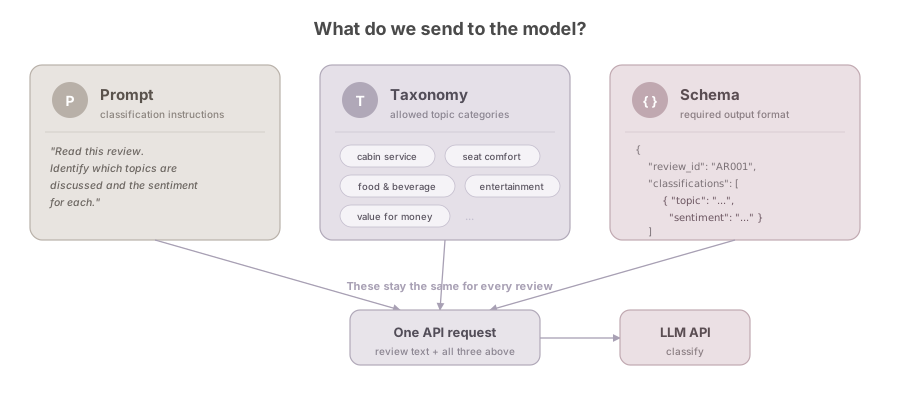
The workflow
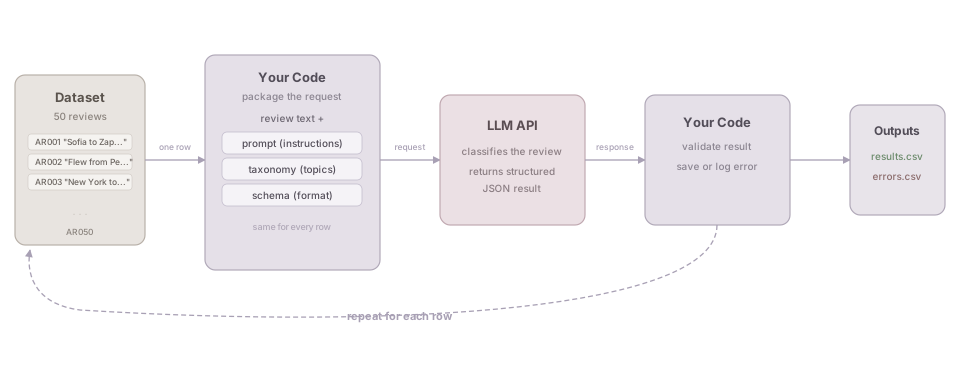
What should one result look like?
A good result is not only plausible to read.
It must also be valid enough for the next step in the workflow.
3. Understand the tools
Chat assistant vs coding agent
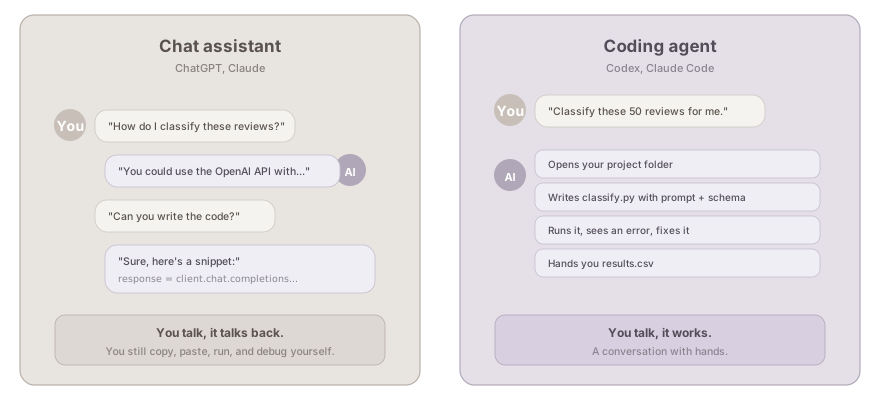
The important difference is not which model is smarter. It is how the tool connects to your project.
Who is doing what?
You
Define the task, taxonomy and review criteria
↓
Coding agent
Build and operate the workflow
↓
LLM API
Classify each review
↓
You
Inspect outputs, errors and disagreements
4. Hands-on
First: a 5-minute set-up check
- The
airline-review-workshopfolder is downloaded and unzipped - Your coding agent (Claude Code, Codex, …) is open in that folder
- Python works. Ask your agent:
Check whether Python 3.10 or above is installed on this computer. If not, help me install it.
Stuck? Raise your hand, or pair up with your neighbour.
Your workshop package
airline-review-workshop/
├── README.md
├── requirements.txt
├── .env.example
├── classification-rule/
│   ├── classification_prompt.md
│   ├── taxonomy.yaml
│   └── output_schema.json
├── data/
│   └── airline_reviews_sample_50.csv
├── compare.py
├── reference_set_final.csv
└── output/
The classification rules, the data, and the comparison script are ready. The only missing piece is classify.py. That is what we will build.
Step 0: Set up the environment
Set up this project for me. Install the Python dependencies from requirements.txt. Then copy .env.example to .env.
After this, add your API key to .env.
Your agent will ask for permission to run commands like pip install. Read what it wants to do, then allow it.
Using an API key
Use your own key if you have one. No key? Raise your hand and we will send you one.
If you use the shared key:
- Use it only for today’s workshop. Do not share or post it anywhere.
- Test with
--limit 3before running all 50 reviews. - Do not ask the agent to send requests in parallel. Everyone shares the same rate limit.
- The key will be disabled after the workshop.
Step 1: Let the agent understand the task
Read the project files in this folder. Tell me:
- what dataset we have
- what the classification task is
- what output format is expected
Do not write any code yet.
Check the agent’s summary together. Does it match what we discussed?
Step 2: Build classify.py and test on 3 reviews
Build classify.py that reads the classification rules from classification-rule/, sends each review to the Anthropic API using claude-haiku-4-5-20251001, validates the output against the schema, and saves results. Run it on the first 3 reviews only.
Watch the terminal output. You should see something like:
[1/3] Classifying AR001... ok
Step 3: Inspect the results
Open output/results.csv and show me the classifications for the 3 reviews we just ran.
Look at each result together:
- Do the topics match what you would pick?
- Does the sentiment make sense for each topic?
- Is anything missing or surprising?
A result can be valid JSON and still be a poor classification. This is where your judgement matters.
5. Refine, scale up, compare
Not happy? Refine the prompt.
If something is off in the results, edit classification-rule/classification_prompt.md.
I updated classification_prompt.md. Re-run classify.py on the same 3 reviews and show me what changed.
This is an iterative process. Change the instructions, re-run, compare.
But do not overfit to these 3 reviews. A prompt that works well on unseen reviews is better than one tuned perfectly for 3.
Scale up: run all 50 reviews
When the prompt looks solid:
Run classify.py on all 50 reviews. Show me a summary when done.
Check the summary: how many succeeded? Any errors?
Open results.csv and show me a few rows. Are there any results that look wrong?
Compare with the reference set
reference_set_final.csv should be in your project folder (if missing, download it again from the GitHub repo). Then:
Run compare.py to compare my results with the instructor reference set. Show me where we disagree and why.
The reference set covers 15 of the 50 reviews. It is not a golden standard. It is a starting point for discussion.
- Where do you agree with the model over the reference?
- Where does the reference seem more reasonable?
- Are there cases where both are defensible?
Bonus: from labels to insights
Finished early? Try turning your results into a chart.
Using output/results.csv, make a bar chart showing how many mentions of each sentiment every topic has. Save it as output/topic_sentiment.png.
This is where classification pays off: 50 reviews become one picture.
Quick check

Go to menti.com
Code: 5570 3604
6. Wrap up
What did we actually do today?
- Looked at the data and understood the classification task
- Told a coding agent what to build, without writing code ourselves
- Inspected the results, refined the prompt, re-ran
- Scaled up and compared with a reference set
Everything lives in the project folder. The data, the instructions, the code, and the outputs. You can inspect it, rerun it, and hand it to someone else.
What can you take home?
The project folder. It is a reusable starting point.
To adapt it to your own task:
- Swap the data (any CSV with an ID and a text column)
- Rewrite the prompt for your domain
- Adjust the taxonomy and schema
- Run the same workflow
The structure stays the same. The content changes.
One more thing: purpose-built classification models
Today we used a general-purpose LLM (Claude Haiku) for classification. It works, but it is also generating text, parsing JSON, and doing much more than we need.
Jev (TypeSafe AI, released last week) is a “System 1” model that only makes decisions. No text generation. You give it options, it picks one.
- $0.042 per million input tokens (output is free)
- Up to 200x cheaper than general-purpose LLMs for classification
- Same workflow, swap the model
The trade-off: a general-purpose LLM can explain why it chose a label (useful when you need justification or human review). A classification-only model just gives you the answer. Pick based on what you need.
Questions and discussion
- What kind of text data do you work with?
- Where could a similar workflow help?
- What would be the hardest part to specify for your task?

Appendix
Appendix: LLM-as-a-judge
A related idea: use another LLM to evaluate the first LLM’s classifications.
For example, ask a second model: “Is this classification supported by the review text?”
This can help spot problems at scale, but the judge is also a model, not an objective answer key. It works best when you give it specific criteria rather than asking “is this good?”
Not something we cover in today’s workshop, but worth exploring if you scale this up to thousands of reviews.
Appendix: A simple mental model
DATA
  ↓
TASK SPECIFICATION
  taxonomy + instructions + schema
  ↓
WORKFLOW
  input → API call → validation → storage
  ↓
EVALUATION
  technical checks + reference comparison + error analysis
  ↓
REVISION
  data, taxonomy, prompt, code or review process
Appendix: Common failure modes
Technical
- Missing or exposed API key
- Wrong file path
- Dependency mismatch
- Rate limit or failed request
- Invalid or truncated JSON
- Silent loss of failed records
Substantive
- Hallucinated topic
- Missed aspect
- Wrong taxonomy boundary
- Sentiment attached to wrong topic
- Duplicate topic
- Over- or under-use of review flag
Appendix: If the live build fails
The learning can continue with prepared outputs:
- inspect the result structure;
- run validation locally;
- compare with the reference set;
- diagnose disagreement;
- propose changes to the task specification.
A failed API call should not cancel the evaluation exercise.
Appendix: Terms used today
LLM
A model that can generate and analyse language.
API
An interface that allows software to send requests to a service and receive responses.
Coding agent
A tool that can work with project files, write code and run commands in an iterative loop.
Taxonomy
The controlled set of topic categories used for classification.
Output schema
A machine-readable definition of the expected response structure.
Reference set
Instructor-reviewed examples used as common comparison points.
Agentic Workflow Series · LLM-Assisted Text Analysis